Files
jxc4-bluetooth-printer/README.md
2025-11-28 10:35:11 +08:00

81 lines
5.3 KiB
Markdown
Raw Permalink Blame History

This file contains ambiguous Unicode characters
This file contains Unicode characters that might be confused with other characters. If you think that this is intentional, you can safely ignore this warning. Use the Escape button to reveal them.
## @作者zhang-shu-wei
## @日期2022年10月8日
## @邮箱2966211270@qq.com
## 一、打印机参数信息
### 项目名:京西云打印机
### 英文名jxc4-Bluetooth-printer
### 分支名cliCode
### 微信小程序运行指令npm run dev:mp-weixin
### 微信小程序打包指令npm run build:mp-weixin
### AppIdwx2bfbc02e6251b71b
### Secretbbfa95292b2ae6ba8a18383707c6277b
### 软件下载地址:[http://pweb.jxc4.com/printer/downLoad.html](http://pweb.jxc4.com/printer/downLoad.html)
### 打印机官网[http://pweb.jxc4.com](http://pweb.jxc4.com/home)
## 二、打印机前端代码部署
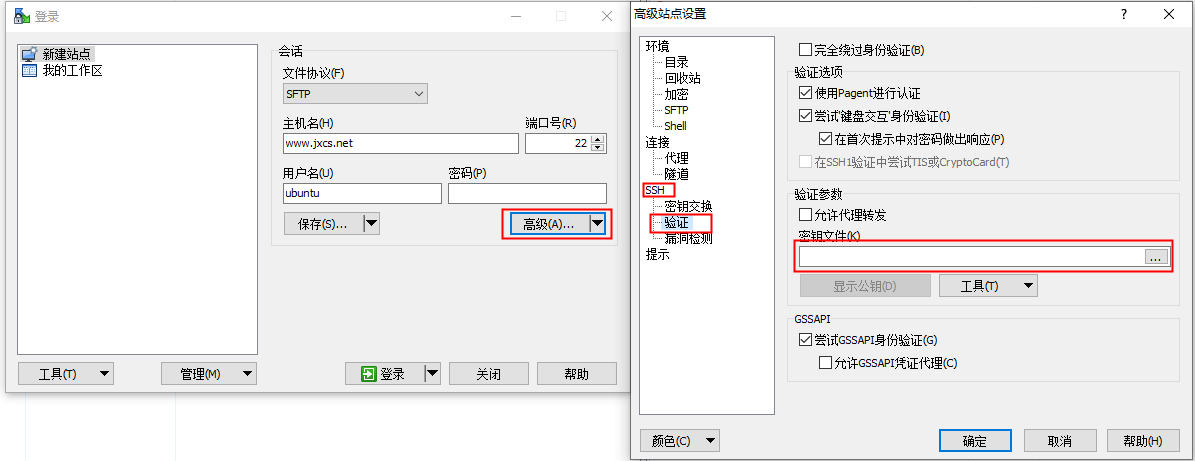
### 推荐使用工具WinSCP
### 连接配置:
文件协议SFTP
主机名www.jxcs.net
端口号22
用户名ubuntu
配置ssh密钥以ssh方式登录
![image.png](https://cdn.nlark.com/yuque/0/2022/png/33553809/1665198564116-d752d07c-b356-4366-9530-fd0b233b2a47.png#clientId=u2a08c06b-57cd-4&crop=0&crop=0&crop=1&crop=1&from=paste&height=461&id=u9b25b358&margin=%5Bobject%20Object%5D&name=image.png&originHeight=461&originWidth=1195&originalType=binary&ratio=1&rotation=0&showTitle=false&size=52715&status=done&style=none&taskId=u187b010c-e9d1-4065-86d3-2db1e6c30b8&title=&width=1195)
ssh密钥在项目根目录ssh_key.ppk
打印机官网服务器地址:/jxdata/webroot/printer_web
打印机静态资源存位置:/jxdata/webroot/printer_web/printer
## 三、打印机移动端说明(Android
### 项目打包
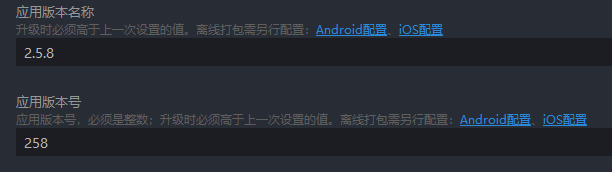
1.版本更新:需要更新《应用版本名称》和《应用版本号》
注意使用 每次更新 版本号需要高于上一次跟新的版本号,否则回导致更新失败
![image.png](https://cdn.nlark.com/yuque/0/2022/png/33553809/1665198672850-4b6de819-6b35-43b5-932d-1c3665bba04d.png#clientId=u2a08c06b-57cd-4&crop=0&crop=0&crop=1&crop=1&from=paste&height=172&id=u354d5fe8&margin=%5Bobject%20Object%5D&name=image.png&originHeight=172&originWidth=612&originalType=binary&ratio=1&rotation=0&showTitle=false&size=12426&status=done&style=none&taskId=ua0c77334-fc61-4c8f-94dc-cd13f884595&title=&width=612)
2.更新分类--整包更新
整包更新就是重新下载软件把用户当前安装的版本替换掉
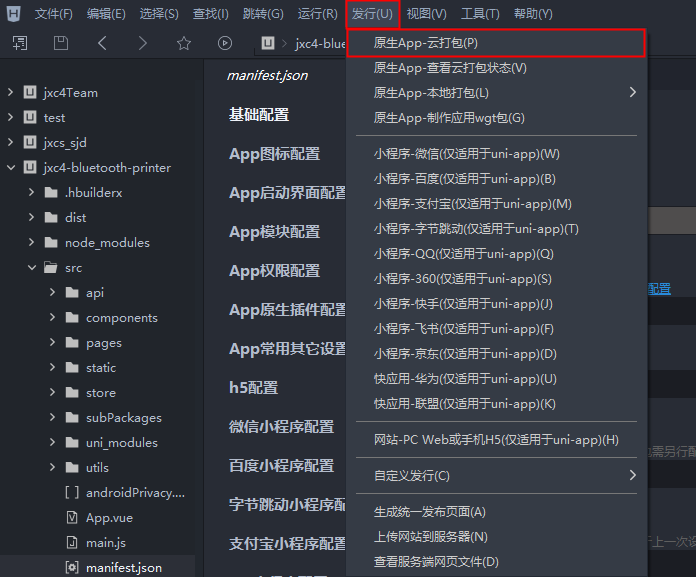
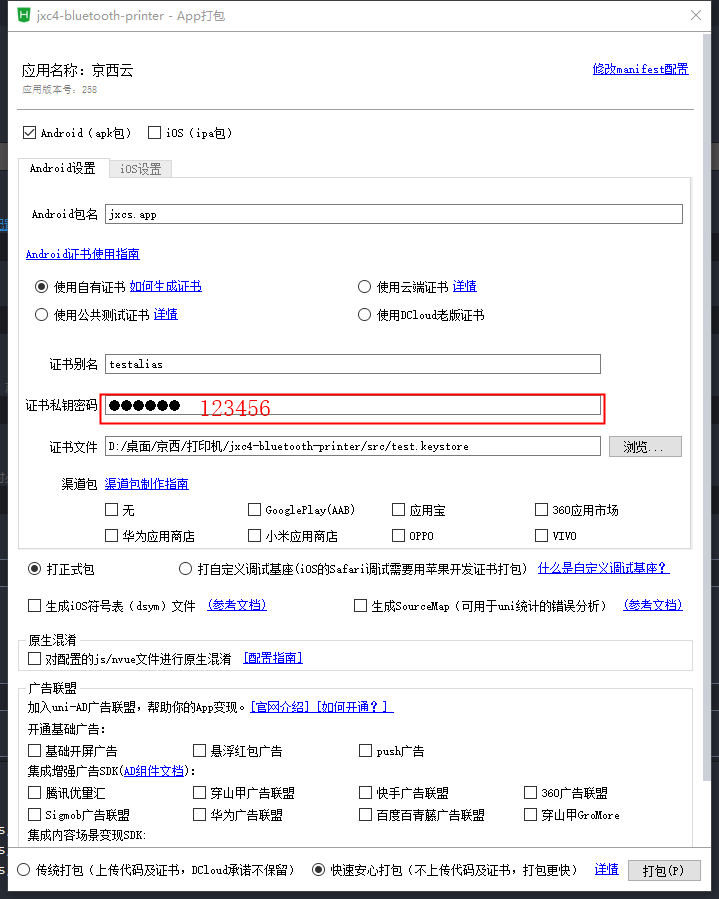
整包更新步骤--发行--原生App-云打包(p)
![image.png](https://cdn.nlark.com/yuque/0/2022/png/33553809/1665198921816-2e35d877-d98d-4212-b255-7dffb4eeb4f0.png#clientId=u2a08c06b-57cd-4&crop=0&crop=0&crop=1&crop=1&from=paste&height=577&id=uf807e5d7&margin=%5Bobject%20Object%5D&name=image.png&originHeight=577&originWidth=696&originalType=binary&ratio=1&rotation=0&showTitle=false&size=73842&status=done&style=none&taskId=u0f976bb2-572b-4837-b211-aff1066b122&title=&width=696)
![image.png](https://cdn.nlark.com/yuque/0/2022/png/33553809/1665198991031-4c59be94-d350-4ab1-bbee-b244b9118187.png#clientId=u2a08c06b-57cd-4&crop=0&crop=0&crop=1&crop=1&from=paste&height=899&id=u31a1f08b&margin=%5Bobject%20Object%5D&name=image.png&originHeight=899&originWidth=719&originalType=binary&ratio=1&rotation=0&showTitle=false&size=55320&status=done&style=none&taskId=u5e2b6b8d-a84b-463c-b092-af77933cc79&title=&width=719)
3.更新分类-热更新(wgt)
热更新每次更新版本号需要大于上一次版本更新版本号
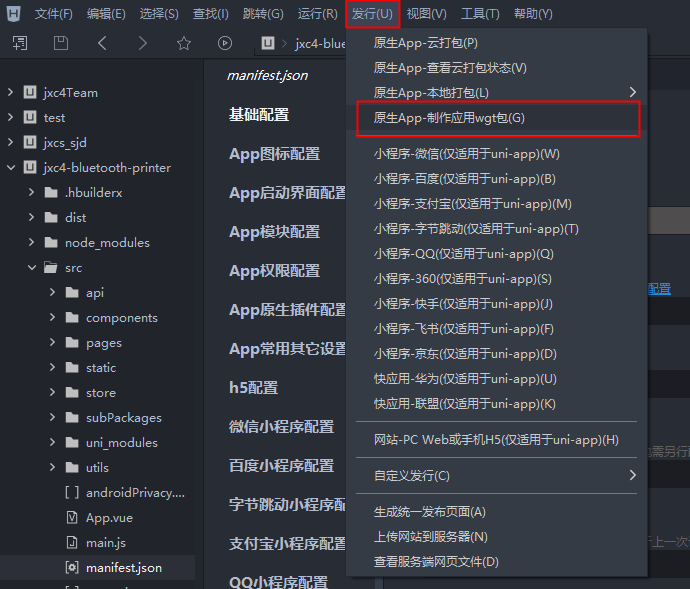
热更新步骤:发行--原生App-制作应用wgt包(G)
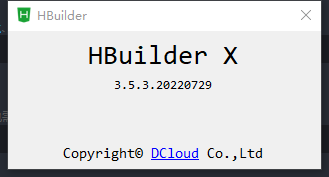
注意使用热更新wgt 的时候 hbuilderX的版本必须要是3.5.3 否则使用热更新会出错
![image.png](https://cdn.nlark.com/yuque/0/2022/png/33553809/1665199264167-2370f6f8-550d-49fa-958c-a377bde973a2.png#clientId=u2a08c06b-57cd-4&crop=0&crop=0&crop=1&crop=1&from=paste&height=177&id=u08b3fc96&margin=%5Bobject%20Object%5D&name=image.png&originHeight=177&originWidth=329&originalType=binary&ratio=1&rotation=0&showTitle=false&size=7366&status=done&style=none&taskId=u2f37263c-46cb-419e-9635-68e41aea2cb&title=&width=329)
![image.png](https://cdn.nlark.com/yuque/0/2022/png/33553809/1665199124065-4b6208a6-78af-4387-8a4b-9a07a1e5bc91.png#clientId=u2a08c06b-57cd-4&crop=0&crop=0&crop=1&crop=1&from=paste&height=589&id=u2ed1885a&margin=%5Bobject%20Object%5D&name=image.png&originHeight=589&originWidth=690&originalType=binary&ratio=1&rotation=0&showTitle=false&size=75393&status=done&style=none&taskId=u573a72eb-9685-45e9-838f-6448f16f933&title=&width=690)
## 四、项目规范
项目使用cli 构建src/pages 当中的文件为主包文件,主包文件应当只放主页四个文件,其他页面组件放在分包文件夹
subPackages 为分包文件夹,其他页面放在分包文件夹里面
### 项目开发规范
1.项目文件夹构建时因该遵循data 数据放在data.js 当中 methods 方法放在methods.js 中 样式文件放在xxx.scss 文件中而html 就写在xxx.vue 当中,详细规范请查看其他文件夹规范操作
```
```
<!-- 首页新公告new 图标 -->
<uni-icons v-if="showIcon === true || showIcon === 'true'" custom-prefix="iconfont" class="uni-noticebar-icon" type="icon-new" color="rgb(184, 7, 7)" size="34" />
<!-- 打印机列表搜索框 -->
<uni-icons custom-prefix="iconfont" color="#c0c4cc" size="18" type="icon-sousuo" />
<text style="color:#fff;" @click="cancel" class="uni-searchbar__cancel" v-if="cancelButton ==='always' || show && cancelButton ==='auto'">{{cancelTextI18n}}</text>
<!-- select 图标 -->
<uni-icons v-else custom-prefix="iconfont" class="uni-noticebar-icon" :type="showSelector? 'icon-jiantoushang' : 'icon-jiantouxia'" size="14" color="#999" />
```
```